en


The ECLBET app puts your account, the full lobby and the cashier on your phone. There are two builds: an Android APK served from our own download link, and an iPhone install that runs through a configuration profile. Both are free, although your mobile provider may charge for the data you use.
Android and iOS handle apps from outside their stores differently, so the two install flows are not the same length. Below are the download locations, the exact steps for each system, and what to do when an APK refuses to open.
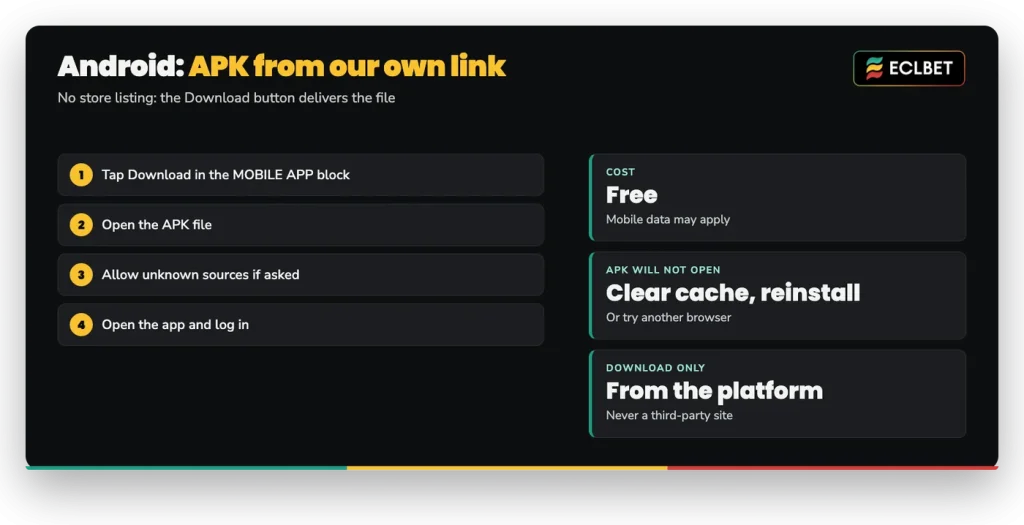
Both versions sit behind the same place: the Download button in the MOBILE APP block on the platform’s homepage, with a second link in the platform footer. Open it from the phone you want to install on, because the file is delivered to the device you are browsing with.
There is no store listing to search for. Android receives an APK file directly, while iPhone users are sent to a separate download page for the configuration profile install. That is also the reason the next section starts with a permission rather than a tap.
Good to know
The Android button carries a Google Play label, but it downloads the APK directly from us.
As a rule, Android blocks installs from anywhere other than its own store until you grant that permission, and the permission is tied to the app that delivered the file. So if you downloaded with Chrome, Chrome is the app you approve. Nothing else about your phone changes, and the switch can be turned off again afterwards.
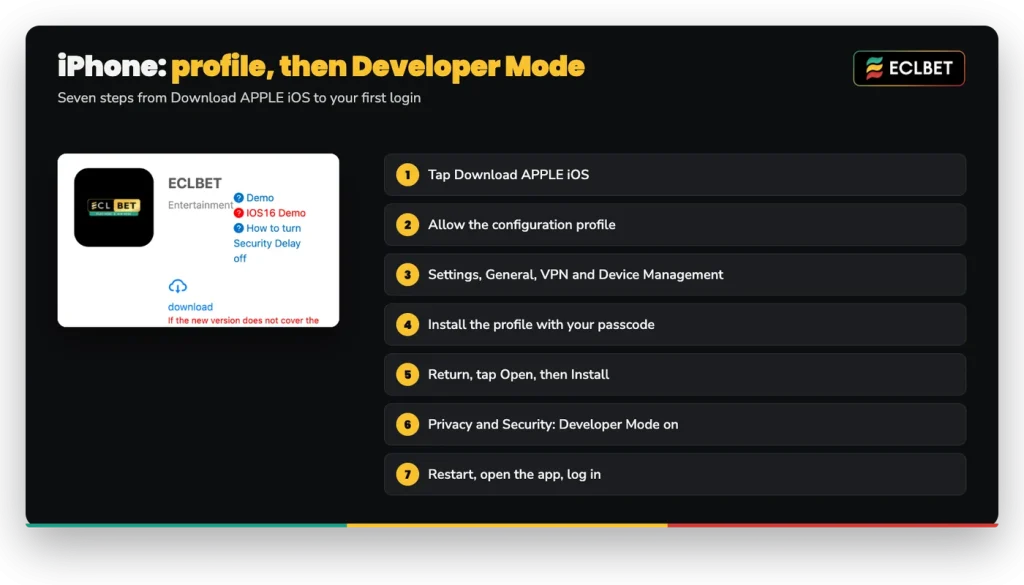
The iOS route adds two concepts to understand before you start. A configuration profile is, in general terms, a small settings file that iOS installs with your passcode so the device trusts and runs software delivered outside the App Store. Developer Mode is the related iOS setting that permits such an app to launch at all, and switching it on requires a restart because the system applies the change at boot.
Neither step is unusual for an app distributed this way. Work through them in order, since iOS will not show the next option until the previous one is complete.
If the icon appears but the app closes at launch, check step seven before trying anything else.
| Install detail | Android | iPhone |
|---|---|---|
| How it installs | APK file from our download link | Configuration profile first, then the app |
| What you allow | Installation from unknown sources, if asked | The configuration profile, with your passcode, plus Developer Mode |
| Where to look in settings | The install permission of your browser | Settings > General > VPN and Device Management, then Settings > Privacy & Security |
| Restart | Not part of the install | Required after Developer Mode is switched on |
| Logging in | Existing username and password | Existing username and password |
| Cost | Free, mobile data charges may apply | Free, mobile data charges may apply |
The practical difference is where the trust decision happens. Android asks once, at the moment of installing the file. iOS splits it between a profile you install yourself and a system setting you enable afterwards.
Both builds sit behind the same Download button in the platform lobby, and you log in with the account you already have.
Work through the four fixes in order. Allow installation from unknown sources for the browser that downloaded the file. If the installer still stalls, clear the cache and data of the app, remove it, and install the file again from scratch.
A different browser is the third option. Downloads can arrive incomplete, and a second attempt through another browser can produce a file that installs cleanly. Should the app install but refuse your credentials, check the username and password character by character before you reset your password, since usernames cannot be changed after registration.
Still stuck? Our Live Chat runs 24/7 and can continue from where the install failed.
The app and the browser share a single account and a single balance, but only one session runs at a time. Logging in on the app therefore signs you out of the desktop browser, and logging in on desktop signs you out of the app. Nothing is lost when that happens: your history, pending transactions and promotions follow the account, not the device.
One account per person is the other rule to keep in mind, as multiple accounts may be suspended.
The app opens on the same products as the browser: sportsbook and esports, live casino clubs, slots, 4D and fast games. Deposits, withdrawals, transfers between the Main Wallet and your game clubs, the Voucher panel, Rebates, VIP and the Events menu are all reached through the member menu, exactly as they are on a computer, so everything in the lobby is available from the phone.
Take the file only from the Download button inside the official platform or its footer link. An APK hosted on a third-party site can carry a login screen built to look like ours, and in general that is how credentials get harvested from mobile users. If you are unsure which address you are on, the About Us page of the platform lists the official addresses, and bookmarking one of them saves you from guessing later.